Guideline to develop a push notification for Andriod App
Mobile push notifications are striking at boosting app engagement and retention, and in reality, you don’t really have an effective app strategy without them.
Push notification is a message that Andriod or ios displays outside of the app Ui. The message in the notification might be any one of the following.
- Communicative
- Reminder for an upcoming or past event or activity.
The user selection or tap on the notification will open the message on the app.
Types of push notifications
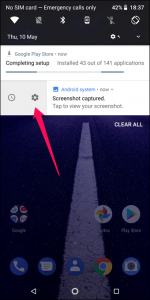
Notification Drawer or Status Bar
Generally, notification displayed on the status bar. The user can drag or swipe down to view the more details and can take any action(Hide or close) for the notification. A notification rests noticeable in the notification drawer until discharged by the app or the user.
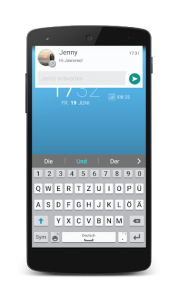
Heads up notifications
These type of notifications display the message or content in a floating window. The notification disappears the content after a moment but remains visible in the notification drawer as usual.
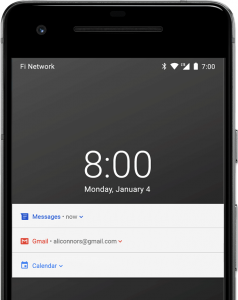
Lock Screen Notifications
Android has enabled the lock screen notifications from version 5.0(lollipop). The user can set the preferences to display the notifications on the lock screen. Even on the lock screen, the notifications disappear after some time but it will display the app icon to identify easily.
Icon badge
In supported launchers on devices running Android 8.0 above, app icons show new notifications with a colored “Dot” on the corresponding app icon.
Long press on the app will open the notifications. Users can then dismiss or act on notifications from that menu, alike to the notification drawer.
Wear OS Notifications
If the user paired mobile with Wear OS devices, all app notifications will be displayed on that worn device with certain action options on expanding. The users can enhance their experience by customizing appearances provided by the devices.
Any must follow some guidelines for displaying the push notifications, let’s see what are that guidelines.
The User or Customer Permissions
G Play store regulations strictly mentioned that push notifications cannot be presented by default. The user permission is necessary to display the notifications up to their preferences. This limits a situation where the user is beset with unwanted push notifications that are difficult to turn off.
Cannot be illusory
One shouldn’t practice Cross-promotion or advertising another product within a notification to mislead the users or customers Some developers have practiced deceptive or misleading practices such as building a new ad-based app that looks virtually like to a popular and well-known mobile application. This issue continues to push notifications, which look like the same as the notifications issued by another app to mislead. In other words, you can’t outwit or deceive users into joining with your app via push notifications.
Cannot Convey Sensitive information
The push notifications should not display the sensitive personal information until unless the device is unlocked. Without the password, anyone can view the notifications this leads to various consequences so the user must set preferences for notification importance.
Other Guidelines
Google has also affected a number of extra guidelines for developers that must keep in mind while developing the push notifications for an app. The following points fall outside of push notifications
- The app must seek the user permission to modify the device hardware settings otherwise apps cannot modify a device’s settings automatically.
- Intermediate ads that appear between two screen loads must have clear buttons for close or exit.
- Developers cannot install shortcuts, icons or bookmarks on the home screen with the purpose of directing the user to an advertisement or promotion.
- Your app cannot offer any sort misleading offers or incentive for uninstalling another application.
Additionally, the Google Play App Store have harsh regulations surrounding app names and descriptions. Practices such as keyword following a more popular app’s description could lead to rejection or removal of the app from the app stores.