


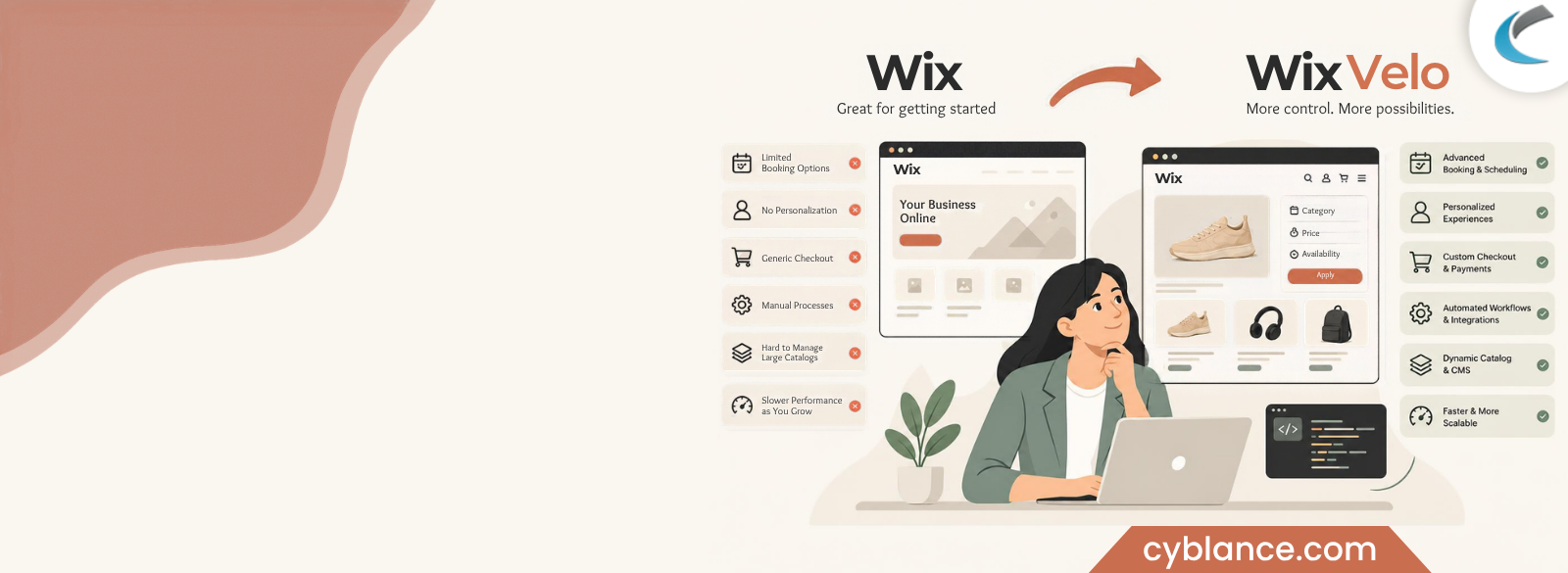
Many business owners reach the same impasse where they think, “My Wix site looks great,” and “Why can’t my site just do this one thing?” You didn’t do anything wrong. You went with Wix because you could get started quickly without hiring a developer. And for the first year or two, that was the right move. But now you’re customizing checkout pages that don’t want to be customized, building booking flows that fall apart the minute a customer needs something a little different, or copy-pasting product data manually because your site can’t pull it from anywhere on its own.
If that sounds familiar, you’re not alone, and you’re not imagining the ceiling. Independent reviews repeatedly call Wix a great tool to begin with but one that serious, growing businesses eventually outgrow due to scalability limits, restrictive customization and performance problems once a site has real traffic and complexity. One review even claims that Wix’s e-commerce tools are adequate for stores with roughly 1,000 monthly orders, but they start to struggle when a business requires advanced developer customization or complex API integrations beyond that. The good news: outgrowing basic Wix doesn’t automatically mean abandoning Wix. It usually means one word: Velo.
This guide walks through how to tell the difference between “I need Velo” and “I need something else entirely,” what Velo genuinely unlocks in plain business terms, what it can’t fix no matter how good the developer is, what it actually costs, and a simple framework to make the call yourself.
Signs Your Wix Site Is Quietly Holding Your Business Back
The truth is, most business owners don’t wake up one day deciding they need custom development. They see friction first, and friction tends to show up in some predictable places.
The way your business actually operates cannot be handled by your booking system – Standard Wix Bookings is designed for simple, linear appointments: one service, one staff member, one time slot. The standard tool starts fighting you instead of helping you as soon as your business needs multi-step bookings, dynamic pricing based on group size or add-ons, staff-specific availability rules or approval workflows before a slot is confirmed.
No personalization for returning customers – Every visitor sees the same homepage, same product order, same content, whether it is their first time browsing or they have ordered from you five times. There is no way to show different content, pricing, or recommendations based on who is logged in, what they have bought in the past, or what page brought them to your site.
Checkout feels like a generic template, not your business. You can’t add custom fields that your order actually needs, you can’t apply conditional pricing rules, you can’t gate certain products behind approval, and you can’t build a quote-request flow instead of a straight “add to cart.” This is often the single biggest frustration for service businesses, B2B sellers, or anyone with tiered pricing. But it’s worth noting that Wix Payments alone doesn’t support merchants in most of Africa, Southeast Asia, Latin America, or Eastern Europe, so international sellers often hit a wall here before customisation needs even come into play.
Everything manual stays manual – New lead comes in, and someone has to manually add them to a spreadsheet, manually send a follow-up email, and manually check inventory before confirming an order. Standard Wix has no real backend logic: no way to trigger an action automatically when a specific event happens on your site.
Your catalog or content library has outgrown drag-and-drop – If you’re manually building a new page every time you add a product, service, listing, or team member, and you’ve got more than a handful of them, you’re spending hours on something that should take minutes.
Your site slows down as it grows – Reviewers repeatedly flag that Wix sites carrying a bookings widget, a chat app, and several galleries can drop to a PageSpeed score around 50 on mobile, with little room to tune performance beyond simply removing features. That’s a different problem from missing functionality, but it often shows up at the same stage of growth.
None of these is signs that Wix was a bad choice. They’re signs you’ve reached the edge of what the no-code layer of Wix was ever designed to do, which is precisely the gap Velo exists to close.
What Velo Actually Unlocks (In Plain Business Terms)
Velo by Wix is Wix’s own full-stack development layer: essentially, real code running underneath your existing site, without requiring you to move to a completely different platform or rebuild everything from zero. You keep your design, your domain, your hosting, and your existing pages. Velo adds the logic and data-handling underneath them.
Here’s what that means for your business, without the jargon:
Instant searching, filtering, and browsing instead of scrolling – Customers can filter by category, price, availability, or any attribute you set and see results update instantly with no page reload rather than a static grid of everything you sell. This feature is especially useful for catalogs, real estate listings, service directories, or any site with more than a dozen items.
Your site can remember who is visiting and show them something different – Logged-in customers can see personalized dashboards, order history, saved preferences, or membership-only content. Returning clients see their account and previous orders; first-time visitors see a generic welcome.
Booking and checkout can follow your business’s real rules, not a generic template – Multi-step bookings, dynamic pricing based on selections, custom quote requests instead of instant checkout, approval steps before an order confirms: all of it becomes possible because the logic runs on your data, not on a fixed template.
Repetitive work happens automatically in the background – A new booking can automatically send a confirmation email, update a spreadsheet, notify your team on Slack, or sync to a CRM, all without anyone touching a keyboard. This is where Velo tends to save the most real hours per week.
One page template creates hundreds of unique pages from a single database – Add a new product, listing, or team member to a spreadsheet-like database, and Velo automatically creates a full page for it; no manual page-building required. And that’s how a catalog of 300 products acts like 300 pages, without anyone having to build 300 pages.
Your site can talk to other systems you already use – Payment processors beyond Wix’s defaults, accounting tools, CRMs, external inventory systems: Velo can connect to outside APIs so your website isn’t an island that requires manual re-entry everywhere else.
In short: Velo turns your website from a digital brochure into a system that does work for you.
What Velo Doesn’t Fix (Myth-Busting)
This is the part most agencies won’t tell you upfront, and it’s worth being direct about, because expecting Velo to solve everything is the fastest way to spend money and still be disappointed.
Velo won’t fix a bad SEO strategy – Code can make your site more capable, but it can’t decide your keyword strategy, write content that actually ranks, or build the backlinks and authority Google rewards. Wix’s technical SEO limitations are real and separate from Velo entirely. Every Wix blog post, for example, lives under a fixed /post/ URL prefix that you can’t remove, no matter how much custom code you add on top.
Velo won’t make a heavy, image-bloated design load fast – If your site is slow because of oversized images, too many animations, or a template stacked with widgets, adding custom code on top makes the performance problem worse, not better. Speed problems usually need to be solved with design discipline first and Velo second. Agencies rebuilding sites for performance often target a 90+ PageSpeed score as the benchmark, a mark Custom Web Audits reports is achievable on Wix without switching platforms; Velo alone won’t get you there if the underlying design is the bottleneck.
Velo won’t turn a confusing site structure into a clear one – If customers can’t find what they need because of poor navigation or unclear messaging, that’s a UX and content problem. Custom functionality on a confusing foundation just gives you a confusing site that also does more things.
Velo doesn’t remove Wix’s platform-level constraints – You’re still on Wix’s infrastructure, still somewhat locked into the Wix ecosystem, and you still can’t export your site the way you could with an open platform, since Wix doesn’t support standard site transfers. Velo extends what you can build within Wix; it doesn’t turn Wix into WordPress or a fully custom stack.
Velo isn’t “no-code.” It requires real JavaScript, real database logic, and an understanding of Wix’s specific development SDK. Done well, it’s genuinely powerful. Done poorly, by someone learning on your live site, it creates fragile features that break the next time Wix pushes a platform update.
If your core problem is SEO, speed, or clarity, Velo is the wrong first investment. If your core problem is missing functionality your business genuinely needs, Velo is very likely the right one.
Cost and Effort Reality: DIY vs. Hiring a Velo Developer vs. Full Rebuild
There are three real paths once you’ve confirmed Velo is the right category of fix, and the honest answer is that the right one depends on your timeline and how mission-critical the feature is.
DIY with Velo (learning it yourself)
This option is realistic if you have some technical curiosity, can invest time, and have moderate needs, such as a basic dynamic catalog and simple form automation. Wix’s own Velo documentation and tutorials are genuinely usable for motivated non-developers. The tradeoff is time: expect weeks, not days, to get comfortable, and expect to rebuild things once or twice as you learn. Cost is close to zero in cash and high in your hours.
Hiring a Velo developer or small studio
This is the middle path most growing companies find themselves on. Freelance Wix/Velo developer rates in 2026 generally fall in the $15 to $150+/hour range, per Osdire’s 2026 hiring guide, based on experience and location. Fixed-scope projects for a defined feature (e.g., a custom booking flow, a member portal, a dynamic catalog) usually range from a few hundred to several thousand dollars, depending on complexity. As a general pattern, junior devs in lower-cost markets tend to bill toward the low end of that range, while specialized senior talent in higher-cost markets like the US commands the top end. This path gets you working functionality in days to a few weeks without having to learn to code and without the cost of a full rebuild.
Full custom rebuild off Wix entirely
Makes sense only when you’ve outgrown far more than Velo can solve: full infrastructure control, complex enterprise integrations, or performance at a scale Wix’s shared hosting genuinely can’t support. Full custom web development projects commonly range from $3,000 on the low end into six figures for complex builds and typically take months rather than weeks, with your SEO and content structure starting over from scratch. That’s overkill for the vast majority of small and mid-sized businesses hitting a functionality wall. Velo solves the same underlying problem for a fraction of the cost and disruption.
The rule of thumb is, if you can name the exact feature that’s missing (a booking rule, a filter, an automation), then that’s a Velo-sized problem. If you cannot quite pinpoint a certain feature, but the entire site just feels wrong, that is a bigger conversation than Velo can solve by itself.
A Simple Decision Framework
Before spending money, run your situation through this checklist. The more boxes you check, the stronger the case for Velo specifically.
- There’s a specific feature missing (not just “the site feels basic”)
- You’ve confirmed no existing Wix app in the App Market already solves it
- The feature involves data: a database, a catalog, customer accounts, or bookings, not just visual design
- You’re doing something manually right now that should trigger automatically
- Customers are asking for something your current setup can’t technically deliver, not just something you haven’t gotten around to
- Your site’s speed and SEO basics are already reasonably solid, and you’re not trying to use Velo to paper over a slow, poorly structured site
- You’re prepared to hire someone qualified rather than have code added by trial and error on your live site
Three or more checked?
Velo is very likely the right next step, and a scoped conversation with a Velo developer about that specific feature is a reasonable next move.
Fewer than three, or is your issue really about speed, SEO, or design clarity?
Fix those first. Adding custom code on top of those problems tends to add cost without solving what’s actually driving customers away.
FAQs
Velo itself doesn’t carry a separate license fee; it’s built into Wix. However, some Velo features and higher usage limits (like database storage or backend capacity) are tied to specific Wix Premium plans, so check plan requirements before scoping a project.
Yes, when done carefully. Velo adds on top of your existing pages instead of replacing them, so if you implement it thoughtfully, it shouldn’t impact your current look or content. The danger is not in Velo itself, but rather in it being implemented too quickly or by someone who does not know what they are doing.
Not necessarily. Many businesses handling well over a thousand orders a month, complex bookings, and custom member areas run entirely on Wix with Velo. Migration usually only becomes necessary at a scale or technical requirement most SMBs never reach.
Ask specifically about Velo/Wix Code experience, not just general Wix site building. Request examples of custom functionality they’ve shipped, not just designed pages, and get a written scope before work starts. Cyblance’s Velo team can scope your specific feature gap and give you a written estimate before any code touches your live site.

