How to Create a Website Like YouTube Fast and Affordable Way?
How to Create a Website Like YouTube Fast and Affordable Way?
How to create a website like YouTube quickly and in an affordable way?
YouTube is well known for viewing unlimited videos online and one can watch by saving the videos offline. It is the destination for billions of people for uploading their videos which are then viewed worldwide. Instead of uploading your video to YouTube, have you ever thought to create your own website like YouTube where millions of other people use your platform to share their video with the world?
If you have a video-oriented goal for your business you can create your own video website. Creating a video website will be very advantageous for you. Therefore, we will guide you to make your own video website similar to YouTube where different users can register, upload videos, create their own channels, like or dislike videos and so much more.
Steps To Create a Website Like YouTube
Acquire a Domain Name
Purchasing a domain name is the first step in creating a website. Thus, you need to buy a domain name for your video website. There should be things that need to consider while purchasing a domain name. Make sure you read the ‘terms of service’ before purchasing a domain. Protect your privacy by choosing the right WHOIS domain registrar. Protect your data from unscrupulous registrars as they might patronize your data to third parties. Look for domain registrars who never falter to provide a free look at their process of registrations and fees.
Signup For Web Hosting
After choosing an appropriate domain name for your website, signing up for web hosting is the next step in which you’ll need to find an appropriate web hosting company. Web hosting is a necessity for any website. Web hosting provides the essential services that a website required to be viewed on the internet. Websites that are hosted are stored on the servers which enable internet users to view your website on the internet. then their browser will connect to the server of your website and passes the results to them. Web hosting requires a specific domain, thus it is mandatory for you to purchase a domain name first and then signup for web hosting.
Using WordPress
To create a website, all you need is a little bit of knowledge of WordPress. WordPress is an open-source tool that is used to create a website. It has become the most powerful CMS (Content Management System) in today’s time and is easy to use. As WordPress presents numerous themes and plugins, it does everything simpler for the user. Thus, you can also use the theme for your website that will make your website similar to YouTube.
Domain Name: The domain name which you have already chosen in the first step. Web Hosting Account: The web hosting account which you have already signed up in the second step WordPress: WordPress is easy to install directly to your website. To install WordPress, you need to fill in details where no tech experience is required.
Installing WordPress to Your Domain
Log in to your Bluehost cPanel
After login into your account, seek out the website section and select Install WordPress.
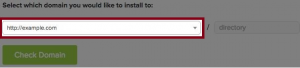
A dialogue box will appear, asking you to enter the domain name of your website. enter your domain name which you have purchased in the first step. You can also enter the directory where exactly you want to install WordPress, Such As ‘About Us’.
If you would like to change the email address, username, and password for the installation of WordPress, you can easily change those settings by clicking on the ‘advanced options’.
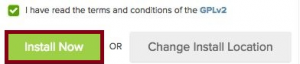
Go through WordPress license agreements and terms of conditions, check the box after overviewing everything, and select the “install” now button.
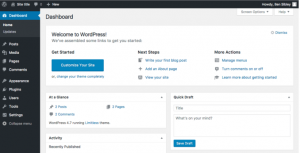
After the installation of WordPress is completed, you can log in to your domain address using the login details. You will see an interface like below
This is the admin panel where you can control every single detail and manage your website. You’ll be using this panel to create, publish and run your website.
Pick a Video Theme
Once, you have installed WordPress, you need to install the theme for recreating YouTube. There are various themes available on WordPress and find a beautiful, manageable, and customizable theme.
Select Sample Data
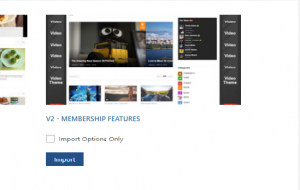
After choosing an appropriate sample data from the packages, click on the import button.
After clicking on the “Import” button, the sample data that you have Selected will be imported quickly to your website. You can study the other options to import a data package for your home page. You must select the “Create” button to view the sample web page.
Launch Your Own YouTube Website
After creating and importing your website interface, all there is left to do is launching. Launch your website and drag more traffic via advertisements and promotions. Hence, this was the complete information and guide to make a website like Youtube. However, if you find any issues in making it, please click here.